Simulate

The site’s SOPs, practiced in a twin of the site.

Some work happens on a floor, not at a desk. Simulate puts your standard operating procedures into a walkable 3D twin of your site, so frontline teams practice the real procedure, on the real device flow, in the right place, before they do it for real.

ACME One WMS · Simulate console

ACME Warehouse Simulate: stock take on the handheld

Concept demonstration · Fictional organization

Everyday SOPs and 2 Drills

Try it · Trainee: employee number 100245 · Leaders: admin code ADMIN-907-315

Open the demo

Best in a current desktop browser. 3D runs on recent tablets; the dashboard works on a phone.

How it works

One real task, start to finish.

  1. Walk your site

    Aisles, bins, docks and stations laid out like yours.

  2. Use the device

    Handheld scans and screens follow your SOP step by step, with a team lead and guide beside you.

  3. Get it right before it counts

    Mistakes cost points, not stock. Every run feeds the readiness dashboard.

Add-on · Drill · practice the bad day

The same SOPs, on the day something goes wrong.

Drills run your procedures under pressure in the same twin: the system drops partway through a shift, or a supplier recalls a lot. Teams practice the fallback and the fix, and the heat map shows which sites are ready.

Drill library

  • The system goes downLiveCount on paper, then key it in without duplicates.
  • Mock recallLiveTrace the lot, hold every pallet of it, find the one in the wrong bin.
  • PlannedShort-staffed shift
  • PlannedCold room temperature alarm
  • PlannedWrong lot caught at pack

Drills are built from your SOPs and your floor, for the incidents your sites actually face.

Try both drills in the demo

For leaders

See who's ready, by site and role.

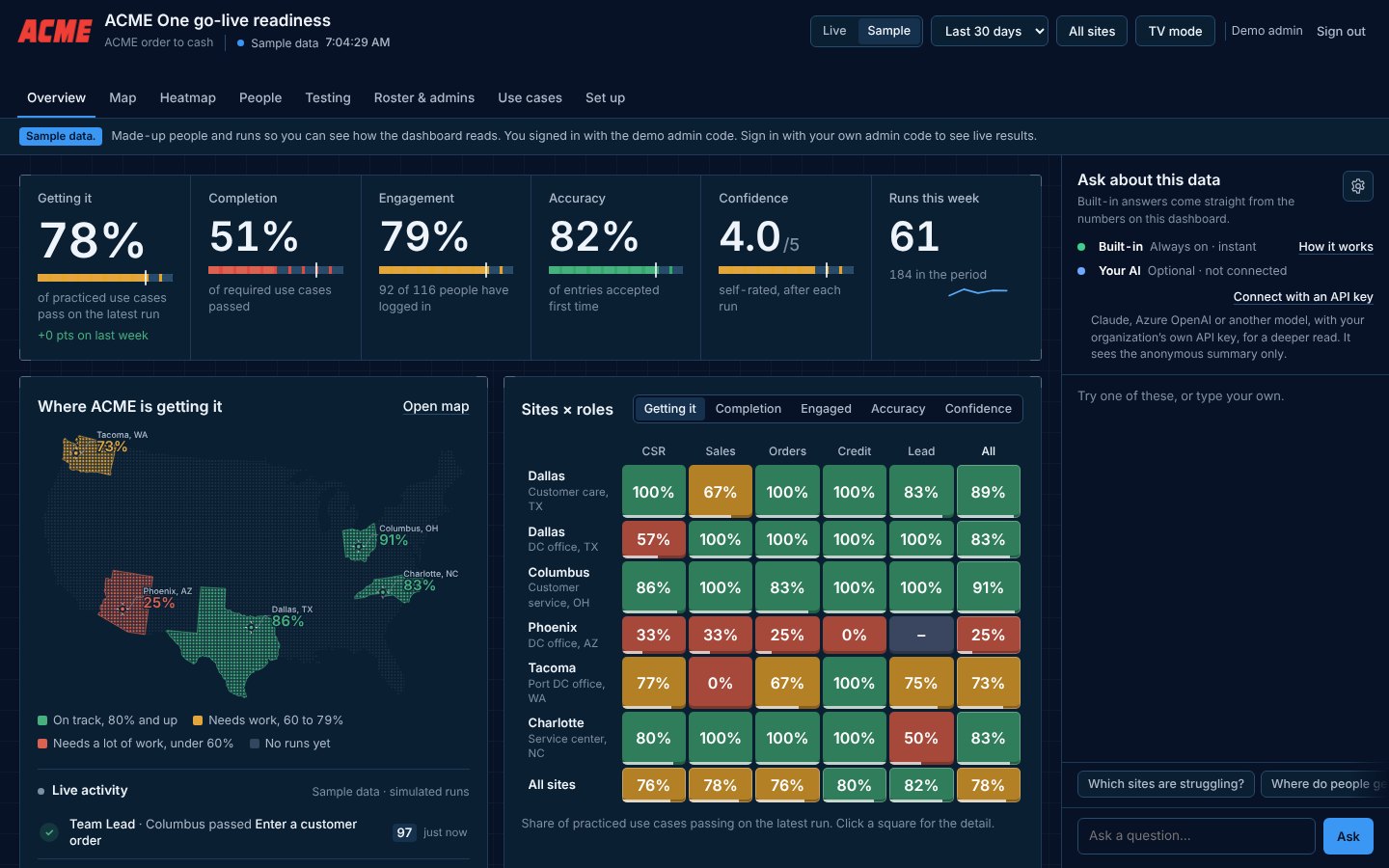
Readiness is not a separate offering: every Practice, Preview and Simulate build comes with the same heat map.

Example: which distribution centers are ready for the handheld stock take, and which could keep shipping in a Drill.

  • Heat map by site and role

    Green 80%+, yellow 60–79%, red under 60%.

  • Five readiness measures

    Getting it, Completion, Engagement, Accuracy, Confidence.

  • Where people get stuck

    And what they say would help.

  • Check-ins after every run

    How ready people feel, in their own words.

  • TV mode and exports

    For site huddles, and CSV for your own reporting.

  • Ask the data

    Built-in answers to plain questions, with the option to connect your organization's own AI service.

Groups under five people are merged, and AI only ever sees an anonymous summary.

Readiness consoleSample data
Readiness dashboard with KPIs, a US map and a sites by roles heat map, using made-up sample data.
Sample data · leadership dashboard from the ACME One Preview demo

Good fit when

Where it earns its place.

  • Warehouses and distribution centers.
  • Plants, labs and service floors.
  • Offices moving to new layouts or devices.

Before we build

Key considerations

What we agree with you before we build, so the trainer fits your IT, your people and your rollout.

Hosting and sign-in

We host your trainer on a private link, and employees sign in with their employee number, so there are no new passwords. If your IT team prefers, we deliver a self-contained package for your intranet or learning system instead, and results stay in your systems. Single sign-on can be scoped in the SOW.

Data, privacy and AI

Built on synthetic data in a recreated version of your screens, never connected to your live system. Leaders see results by site and role, groups under five people are merged, and names are visible only to the admins you choose. The dashboard answers plain questions with built-in logic; if you connect your own AI service, it only ever receives an anonymous summary.

Your team's involvement

  • Process owner or subject-matter expert: walks us through the real task, shares SOPs and screens, answers questions during design and build.
  • IT contact: hosting, sign-in and a security review.
  • Site leads: the roster, the test group, and using the dashboard in site huddles.
  • Reviewers: two structured review rounds and final sign-off.

Rollout

You choose: all sites at once, a pilot site first, or in waves. We agree on it in the SOW and set up the roster, access codes, site posters and dashboard to match.

Devices and languages

Runs in a current desktop browser with 3D graphics, with touch controls on recent tablets. The leadership dashboard works on any device. Language versions and accessibility needs are scoped up front.

What we need from you

Floor plans, photos or a walkthrough video of the site, the devices your teams use, and the SOPs. Add any Drill scenarios you want to practice, such as a system outage.

All of this is written into your Statement of Work.

Where it fits in your rollout

  1. Plan

    Simulate
    Simulate —
    Readiness
    Readiness —
  2. Build

    Simulate
    SimulateThe twin is built from the site
    Readiness
    Readiness —
  3. Go-live

    Simulate
    Simulate · DrillFloor practice, cutover drill
    Readiness
    ReadinessReady, site by site
  4. After go-live

    Simulate
    SimulateSOP revisions
    Readiness
    ReadinessEvery revision, proven

Pick what you are rolling out. These are typical; we map yours with you.

See it in the studio tour →